MERGE
-
If the exact pattern is found, nothing is created;
MERGEacts likeMATCHand binds the found pattern. -
If the exact pattern is not found,
MERGEacts likeCREATEand creates the pattern.
MERGE also allows for specific actions depending on whether the specified pattern was matched (ON MATCH) or created (ON CREATE).
It is recommended to create constraints prior to merging data: they provide index-backed performance improvements (in the case of property uniqueness and key constraints) while also preventing the creation of data that differ in unintended ways from pre-existing data.
For more information, see Using MERGE with constraints below.
Example graph
The following graph is used for the examples below:
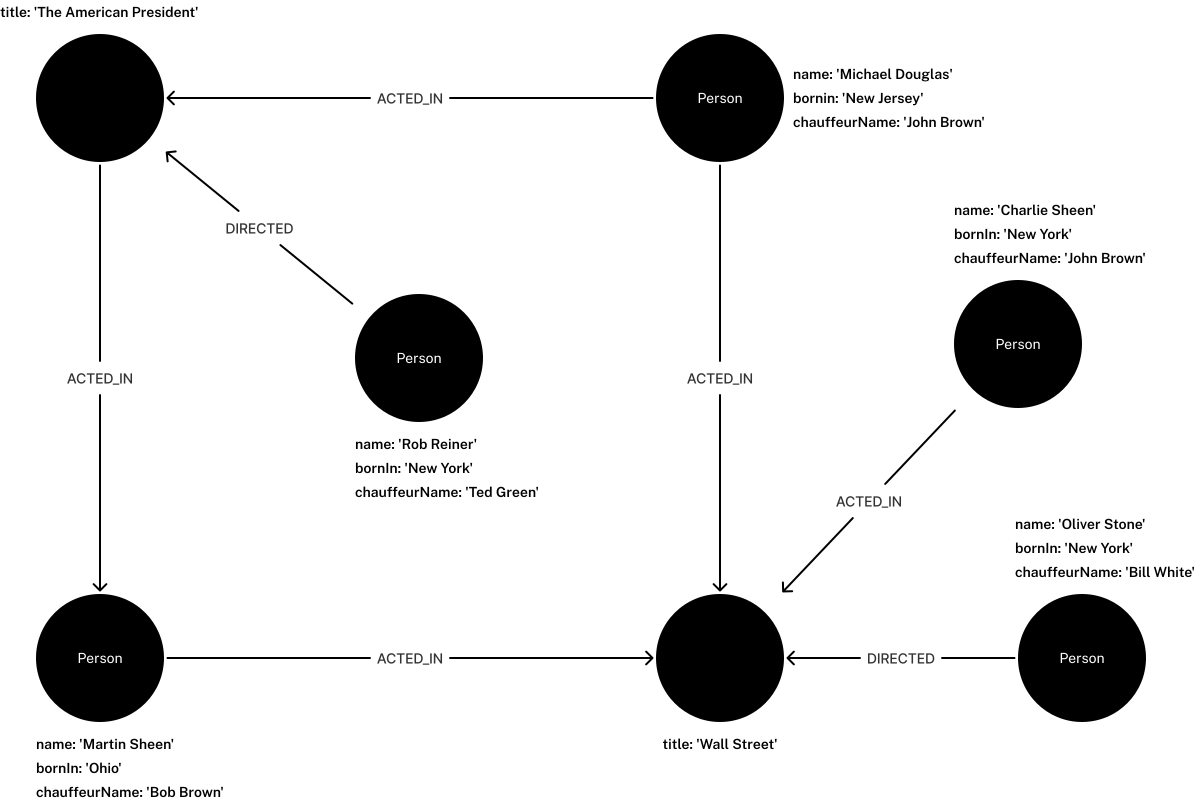
To recreate the graph, run the following query in an empty Neo4j database:
CREATE (charlie:Person {name: 'Charlie Sheen', bornIn: 'New York', chauffeurName: 'John Brown'}),
       (martin:Person {name: 'Martin Sheen', bornIn: 'Ohio', chauffeurName: 'Bob Brown'}),
       (michael:Person {name: 'Michael Douglas', bornIn: 'New Jersey', chauffeurName: 'John Brown'}),
       (oliver:Person {name: 'Oliver Stone', bornIn: 'New York', chauffeurName: 'Bill White'}),
       (rob:Person {name: 'Rob Reiner', bornIn: 'New York', chauffeurName: 'Ted Green'}),
       (wallStreet:Movie {title: 'Wall Street'}),
       (theAmericanPresident:Movie {title: 'The American President'}),
       (charlie)-[:ACTED_IN]->(wallStreet),
       (martin)-[:ACTED_IN]->(wallStreet),
       (michael)-[:ACTED_IN]->(wallStreet),
       (martin)-[:ACTED_IN]->(theAmericanPresident),
       (michael)-[:ACTED_IN]->(theAmericanPresident),
       (oliver)-[:DIRECTED]->(wallStreet),
       (rob)-[:DIRECTED]->(theAmericanPresident)
MERGE existing patterns
If MERGE matches an existing pattern, it will not create anything.
Instead, it will bind the pattern in the same way that MATCH does.
MERGE an existing nodeMERGE (michael:Person {name: 'Michael Douglas'})
RETURN michael.name AS name,
michael.bornIn AS bornInNo new node is created, since there already exists an identical node in the database.
| name | bornIn |
|---|---|
|
|
Rows: 1 |
|
MERGE an existing relationshipMATCH (charlie:Person {name: 'Charlie Sheen'}),
(wallStreet:Movie {title: 'Wall Street'})
MERGE (charlie)-[r:ACTED_IN]->(wallStreet)
RETURN charlie.name AS name,
type(r) AS newRel,
wallStreet.title AS titleCharlie Sheen had already been marked as acting in Wall Street, so the existing relationship is found and returned.
| name | newRel | title |
|---|---|---|
|
|
|
Rows: 1 |
||
null properties
MERGE cannot be used on property values that are null.
For example, the following query will throw an error:
MERGE on null propertyMERGE (martin:Person {name: 'Martin Sheen'})-[r:FATHER_OF {since: null}]->(charlie:Person {name: 'Charlie Sheen'})
RETURN type(r)22N31: error: data exception - invalid properties in merge pattern. The relationship property 22G03: error: data exception - invalid value type |
MERGE new patterns
If MERGE cannot match the exact pattern given in the query, it will create the pattern instead.
To prevent the creation of nodes or relationships that differ in unintended ways from existing ones, it is therefore recommended to use constraints when merging data.
For more information, see Using MERGE with constraints below.
MERGE a new node with labels and propertiesMERGE (robert:Critic:Viewer {name: 'Robert Smith', occupation: 'Journalist'})
RETURN labels(robert) AS labels,
properties(robert) AS propertiesA new node is created because there are no identical nodes in the dataset.
| labels | properties |
|---|---|
|
|
Rows: 1 |
|
Multiple labels can also be separated by an ampersand &, in the same manner as it is used in label expressions.
Separation by colon : and ampersand & cannot be mixed in the same clause.
|
MERGE node with different property valuesMERGE (:Person {name: 'Charlie Sheen', bornIn: "New York", chauffeurName: 'Michael Black'})
MATCH (charlies:Person)
WHERE charlies.name = 'Charlie Sheen'
RETURN charlies.name AS name,
charlies.chauffeurName AS chauffeurA new node with the name Charlie Sheen is created since not all properties matched those set to the pre-existing Charlie Sheen node:
| name | chauffeur |
|---|---|
|
|
|
|
Rows: 2 |
|
MERGE a node derived from an existing node propertyMATCH (person:Person)
MERGE (location:Location {name: person.bornIn})
RETURN person.name AS name,
person.bornIn AS bornIn,
location.name AS locationNode
ORDER BY nameThree Location nodes are created, with name values of New York, Ohio, and New Jersey. Although MATCH returns multiple Person nodes with bornIn: 'New York', only one New York location node is created.
Subsequent matches bind to it rather than creating duplicates.
| name | bornIn | locationNode |
|---|---|---|
|
|
|
|
|
|
|
|
|
|
|
|
|
|
|
|
|
|
Rows: 6 |
||
MERGE can be used with preceding MATCH and MERGE clauses to create a relationship between two bound nodes.
MERGE a relationship between two existing nodesMATCH (person:Person)
MERGE (location:Location {name: person.bornIn})
MERGE (person)-[r:BORN_IN]->(location)
RETURN startNode(r).name AS name,
type(r) AS newRel,
endNode(r).name AS location
ORDER BY nameThe second MERGE creates a BORN_IN relationship between each person and their corresponding Location node.
| name | newRel | location |
|---|---|---|
|
|
|
|
|
|
|
|
|
|
|
|
|
|
|
|
|
|
Rows: 6 |
||
MERGE can also create both a new node and a relationship in a single clause:
MERGE a new node and relationship connected to an existing nodeMATCH (person:Person)
MERGE (person)-[r:HAS_CHAUFFEUR]->(chauffeur:Chauffeur {name: person.chauffeurName})
REMOVE person.chauffeurName
RETURN startNode(r) AS startNode,
type(r) AS newRel,
endNode(r).name AS newChauffeurNode
ORDER BY newChauffeurNodeAs the graph contains no Chauffeur nodes and no HAS_CHAUFFEUR relationships, MERGE creates six Chauffeur nodes, each with a name corresponding to the matched Person node’s chauffeurName property, and a HAS_CHAUFFEUR relationship between each pair.
This differs from the Location example above, where a preceding MERGE bound the Location nodes before the relationship was created.
Here, MERGE matches the full pattern including the relationship, which doesn’t match the existing Person nodes and instead creates new Chauffeur nodes, even if Person nodes with the same names already exist.
| startNode | newRel | newChauffeurNode |
|---|---|---|
|
|
|
|
|
|
|
|
|
|
|
|
|
|
|
|
|
|
Rows: 6 |
||
Undirected relationships
MERGE can be used without specifying relationship direction.
Cypher® tries to match the relationship in both directions first; if no match is found, it creates the relationship left to right.
MERGE an undirected relationshipMATCH (charlie:Person {name: 'Oliver Stone'}),
(oliver:Person {name: 'Michael Douglas'})
MERGE (charlie)-[r:KNOWS]-(oliver)
RETURN startNode(r).name AS from,
type(r) AS relationship,
endNode(r).name AS toAs no KNOWS relationship exists between Oliver Stone and Michael Douglas, MERGE creates one left to right.
| from | relationship | to |
|---|---|---|
|
|
|
Rows: 1 |
||
ON MATCH and ON CREATE
Use ON CREATE and ON MATCH to conditionally execute clauses depending on whether a node or relationship is created or matched.
MERGE with ON CREATEMERGE (keanu:Person {name: 'Keanu Reeves', bornIn: 'Beirut', chauffeurName: 'Eric Brown'})
ON CREATE
SET keanu.created = timestamp()
RETURN keanu.name AS name,
keanu.created AS creationTimestamp| name | creationTimestamp |
|---|---|
|
|
Rows: 1 |
|
MERGE with ON MATCHMERGE (person:Person)
ON MATCH
SET person.updatedAt = date()
RETURN person.name AS name,
person.updatedAt AS updatedAt
ORDER BY name| name | updatedAt |
|---|---|
|
|
|
|
|
|
|
|
|
|
|
|
Rows: 6 |
|
MERGE with ON CREATE and ON MATCHMERGE (keanu:Person {name: 'Keanu Reeves'})
ON CREATE
SET keanu.created = timestamp()
ON MATCH
SET keanu.lastSeen = timestamp()
RETURN keanu.name AS name,
keanu.created AS createdAt,
keanu.lastSeen AS lastSeenBecause the Person node named Keanu Reeves already exists, this query does not create a new node.
Instead, it adds a timestamp on the lastSeen property.
| name | createdAt | lastSeen |
|---|---|---|
|
|
|
Rows: 1 |
||
Using map parameters with MERGE
Unlike CREATE, MERGE does not accept a map parameter directly as a property map (e.g. CREATE (n:Person $param)).
Each property must be specified explicitly:
{
  "param": {
    "name": "Keanu Reeves",
    "bornIn": "Beirut",
    "chauffeurName": "Eric Brown"
  }
}
MERGE with parametersMERGE (person:Person {name: $param.name, bornIn: $param.bornIn, chauffeurName: $param.chauffeurName})
RETURN person.name AS name,
person.bornIn AS bornIn,
person.chauffeurName AS chauffeur| name | bornIn | chauffeur |
|---|---|---|
|
|
|
Rows: 1 |
||
For more information on parameters, see Parameters.
MERGE using dynamic node labels and relationship types
Node labels and relationship types can be referenced dynamically in expressions, parameters, and variables when merging nodes and relationships. This allows for more flexible queries and mitigates the risk of Cypher injection. (For more information about Cypher injection, see Neo4j Knowledge Base → Protecting against Cypher injection).
MERGE (n:$(<expr>))
MERGE ()-[r:$(<expr>)]->()
The expression must evaluate to a STRING NOT NULL | LIST<STRING NOT NULL> NOT NULL value.
Using a LIST<STRING> with more than one item when merging a relationship using dynamic relationship types will fail.
This is because a relationship can only have exactly one type.
{
  "nodeLabels": ["Person", "Director"],
  "relType": "DIRECTED",
  "movies": ["Ladybird", "Little Women", "Barbie"]
}
MERGE nodes and relationships using dynamic node labels and relationship typesMERGE (greta:$($nodeLabels) {name: 'Greta Gerwig'})
WITH greta
UNWIND $movies AS movieTitle
MERGE (greta)-[rel:$($relType)]->(m:Movie {title: movieTitle})
RETURN greta.name AS name, labels(greta) AS labels, type(rel) AS relType, collect(m.title) AS movies| name | labels | relType | movies |
|---|---|---|---|
|
|
|
|
Rows: 1 |
|||
Performance caveats
MERGE queries that use dynamic values may not perform as well as those with static values.
Neo4j is actively working to improve the performance of these queries.
The table below outlines performance caveats for specific Neo4j versions.
| Neo4j versions | Performance caveat |
|---|---|
5.26 — 2025.07 |
The Cypher planner is not able to leverage indexes with index scans or seeks and must instead utilize the |
2025.08 — 2025.10 |
The Cypher planner is able to leverage token lookup indexes when matching node labels and relationship types dynamically.
This is enabled by the introduction of three new query plan operators:
|
2025.11 — current |
The Cypher planner is able to leverage indexes on property values, however:
|
Using MERGE with constraints
Constraints on identifying properties (such as id) when using MERGE prevents duplicating data that differ in unintended ways.
They also protect against duplicate creation under concurrent loads, where MERGE alone only guarantees the existence of the pattern, not its uniqueness.
Enforce property existence and uniqueness with key constraintsEnterprise Edition
There are two ways to ensure the uniqueness of a property value in a database: property uniqueness constraints and key constraints. Both are backed by indexes, which provide significant performance improvements. Key constraints are the preferred option, however, since they both guarantee the existence and uniqueness of a property.
CREATE CONSTRAINT FOR (n:Product) REQUIRE n.id IS NODE KEYMERGE a node that complies with key constraintMERGE (n:Product {id: 12, category: 'Electronics', type: 'Laptop'})A subsequent MERGE with the same id but different properties will fail rather than create a duplicate:
MERGE a node that violates key constraintMERGE (n:Product {id: 12, category: 'Computing', type: 'Laptop'})22N80: error: data exception - index entry conflict. Index entry conflict: Node(23) already exists with label 22N79: error: data exception - property uniqueness constraint violated. Property uniqueness constraint violated: Node(23) already exists with label |
Similarly, an attempt to MERGE a node with a missing id property would fail due to the key constraint:
MERGE a node that violates key constraintMERGE (n:Product {category: 'Computing', type: 'Laptop'})22N77: error: data exception - property presence verification failed. NODE (24) with label 'Product' must have the following properties: |
Enforce property value types with property type constraintsEnterprise Edition
Property type constraints are useful to enforce type correctness when merging data.
CREATE CONSTRAINT FOR (n:Product) REQUIRE n.id IS :: INTEGERMERGE a node that complies with property type constraintMERGE (n:Product {id: 13, category: 'Electronics', type: 'Laptop'})MERGE a new node that violates property type constraintMERGE (n:Product {id: "13", category: 'Electronics', type: 'Laptop'})22N78: error: data exception - property type verification failed. NODE (25) with label 'Product' must have the property |
Cypher offers the following functions to cast data while merging:
MERGE a node that casts data type and complies with property type constraintMERGE (n:Product {id: toInteger("14"), category: 'Electronics', type: 'Laptop'})Concurrent relationship merges
MERGE a relationship between two previously bound nodesMATCH (keanu:Person { name: 'Keanu Reeves' })
MATCH (charlie:Person { name: 'Charlie Sheen' })
MERGE (keanu)-[:KNOWS]->(charlie)If the above query is run sequentially, MERGE creates the relationship on the first execution and matches it on any subsequent run.
If the same query is run concurrently, Neo4j preserves this behavior by acquiring exclusive locks on both end nodes when no match is found, preventing two transactions from creating the relationship simultaneously.
After locking, MERGE performs a second MATCH to account for any race condition between the initial failed match and lock acquisition.
This serialization guarantee for concurrent updates does not rely on a uniqueness constraint.
Cypher has no constraint that limits the number of relationships of a given type between two nodes, so the guarantee is provided by the locking behavior used by MERGE.