AWS Strands Agents Integration
This guide shows how to add Neo4j Context Graph memory to AWS Strands agents. The integration offers two complementary modes, usable independently or together on the same agent:
| Mode | What it does | Reach for it when |
|---|---|---|
Memory tools (pull-based) |
|
You want the agent in explicit control — deep queries, on-demand recall, storing extra-conversational facts. |
Session manager (push-based) |
|
You want zero-effort conversation capture and continuity — nothing depends on the model remembering to call a tool. |
Overview
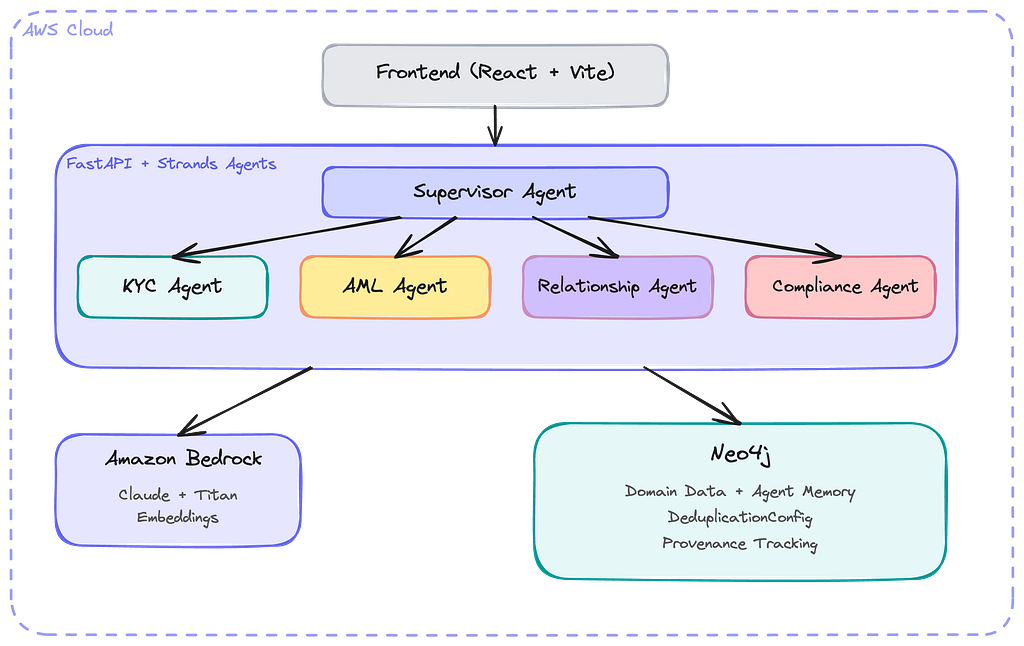
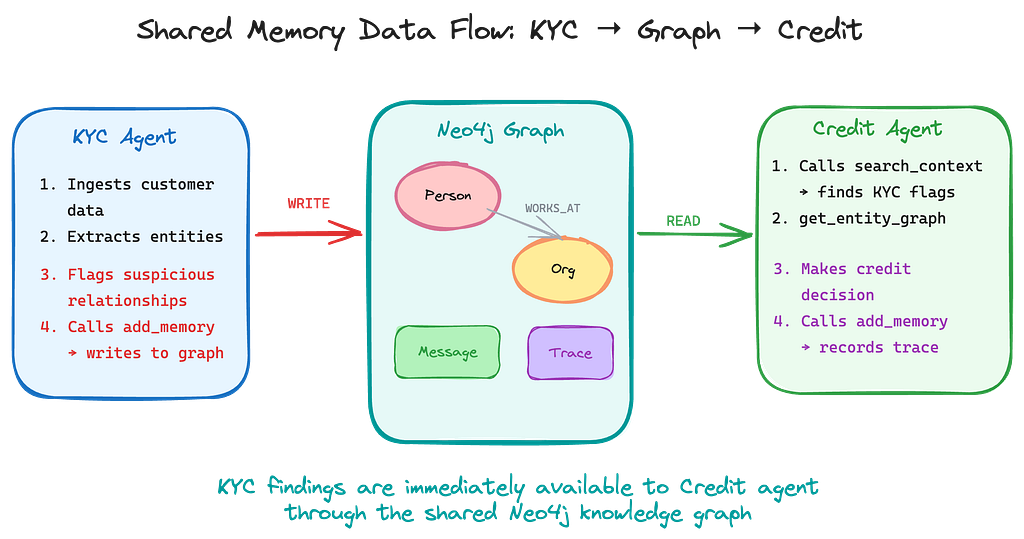
Both modes write into the same knowledge graph, which is what enables the multi-agent "shared brain" shown above: what one agent learns, every other agent can retrieve (see The Shared-Brain Pattern).
Quick Start
This example combines both modes: the session manager captures and restores the conversation transparently, while the tools give the agent explicit memory operations.
from strands import Agent
from neo4j_agent_memory import MemorySettings
from neo4j_agent_memory.integrations.strands import (
    Neo4jRetrievalConfig,
    Neo4jSessionManager,
    context_graph_tools,
)

# Pull-based tools — the agent decides when to search or store.
tools = context_graph_tools(
    neo4j_uri="neo4j+s://xxx.databases.neo4j.io",
    neo4j_password="your-password",
    embedding_provider="bedrock",
)

# Push-based session manager — every turn persisted, history restored,
# relevant memories injected into each user message (opt-in).
manager = Neo4jSessionManager(
    "support-42",
    settings=MemorySettings(
        neo4j={
            "uri": "neo4j+s://xxx.databases.neo4j.io",
            "password": "your-password",
        },
    ),
    retrieval_config=Neo4jRetrievalConfig(),
)

agent = Agent(
    model="anthropic.claude-sonnet-4-20250514-v1:0",
    tools=tools,
    session_manager=manager,
)

agent("Remember that I prefer Python over JavaScript")
Using the hosted NAMS service instead of self-hosted Neo4j? Swap in the
NAMS variants — both read MEMORY_API_KEY (and optionally
MEMORY_ENDPOINT) from the environment:
from neo4j_agent_memory.integrations.strands import (
    Neo4jRetrievalConfig,
    Neo4jSessionManager,
    nams_context_graph_tools,
)

manager = Neo4jSessionManager.for_nams(
    "support-42",
    retrieval_config=Neo4jRetrievalConfig(),
)
tools = nams_context_graph_tools()|
Do not share a |
Each mode also works on its own — the next two sections cover them independently.
Memory Tools (Pull-Based)
The integration provides four memory tools that agents can use:
| Tool | Purpose |
|---|---|
|
Semantic search across memories and entities |
|
Explore relationships around an entity |
|
Store information with entity extraction |
|
Retrieve user preferences by category |
|
When a session manager is attached (see Session Manager (Push-Based)),
conversation capture is automatic — |
Configuration
Basic Configuration
from neo4j_agent_memory.integrations.strands import context_graph_tools

tools = context_graph_tools(
    # Neo4j connection
    neo4j_uri="neo4j+s://xxx.databases.neo4j.io",
    neo4j_user="neo4j",
    neo4j_password="your-password",
    neo4j_database="neo4j",

    # Embedding configuration
    embedding_provider="bedrock",  # or "openai", "vertex_ai"
    embedding_model="amazon.titan-embed-text-v2:0",

    # AWS configuration (for Bedrock)
    aws_region="us-east-1",
)
Using StrandsConfig
from neo4j_agent_memory.integrations.strands import StrandsConfig, context_graph_tools

config = StrandsConfig(
    neo4j_uri="neo4j+s://xxx.databases.neo4j.io",
    neo4j_password="your-password",
    embedding_provider="bedrock",
    embedding_model="amazon.titan-embed-text-v2:0",
    aws_region="us-east-1",
)

tools = context_graph_tools(**config.to_dict())
From Environment Variables
from neo4j_agent_memory.integrations.strands import StrandsConfig, context_graph_tools

# Reads from environment variables
config = StrandsConfig.from_env()
tools = context_graph_tools(**config.to_dict())
Required environment variables:
export NEO4J_URI=neo4j+s://xxx.databases.neo4j.io
export NEO4J_PASSWORD=your-password
export AWS_REGION=us-east-1
Pass-Through Your Strands Model
Strands agents typically use Bedrock model strings (e.g. "anthropic.claude-sonnet-4-20250514-v1:0"). llm_provider_from_strands accepts either a bare string or a model object and prepends bedrock/ when no provider prefix is present:
from neo4j_agent_memory import MemoryClient, MemorySettings
from neo4j_agent_memory.integrations.strands import (
    llm_provider_from_strands,
)

provider = llm_provider_from_strands(
    "anthropic.claude-sonnet-4-20250514-v1:0",
)

settings = MemorySettings(
    neo4j={"password": "p"},
    llm=provider,
    embedding="bedrock/amazon.titan-embed-text-v2:0",
)
The context_graph_tools(…) helper already resolves the embedder via from_provider internally — the pass-through is only needed when you want the same model used by both the agent and memory extraction.
Tool Details
search_context
Search for relevant memories and entities:
# Agent calls this tool automatically
result = search_context(
    query="What do I know about the Acme project?",
    user_id="user-123",
    top_k=10,           # Max results
    min_score=0.5,      # Similarity threshold
    include_relationships=True,
)
Returns:
-
Matching messages with similarity scores
-
Related entities
-
Entity relationships (if enabled)
get_entity_graph
Explore relationships around an entity:
result = get_entity_graph(
    entity_name="Acme Corp",
    user_id="user-123",
    depth=2,                    # Relationship depth
    relationship_types=None,    # All types, or filter
)
Returns:
-
Entity details
-
Connected entities
-
Relationship types and properties
add_memory
Store information with automatic entity extraction:
result = add_memory(
    content="John Smith from Acme Corp called about the Q4 project",
    user_id="user-123",
    session_id="session-456",
    extract_entities=True,  # Auto-extract entities
)
Returns:
-
Memory ID
-
Extracted entities (if enabled)
-
Entity relationships created
Agent System Prompts
Guide your agent to use memory effectively:
agent = Agent(
    model="anthropic.claude-sonnet-4-20250514-v1:0",
    tools=tools,
    system_prompt="""You are an assistant with persistent memory.

MEMORY USAGE:
1. At the start of a conversation, use search_context to find relevant history
2. When the user mentions entities (people, companies), use get_entity_graph
3. Store important facts with add_memory
4. Check get_user_preferences for personalization

Always reference your memory when it's relevant to the conversation.""",
)
Error Handling
Tools return error information in results:
# If Neo4j is unavailable
{
    "error": "ConnectionError",
    "message": "Failed to connect to Neo4j",
    "memories": [],
    "entities": []
}
Configure the agent to handle errors gracefully:
agent = Agent(
    tools=tools,
    system_prompt="""...

If a memory tool returns an error, acknowledge it and continue
without that context. Don't expose internal errors to users.""",
)Session Manager (Push-Based)
Neo4jSessionManager plugs into the Strands session lifecycle: pass it to
Agent(session_manager=…) and every turn is persisted automatically,
conversation history is restored on agent restart, and (opt-in) relevant
long-term memories are injected into each user message before the model sees
it. Nothing depends on the model deciding to call a tool.
Construction
For self-hosted Neo4j, pass settings= and the manager owns the client
lifecycle:
from neo4j_agent_memory import MemorySettings
from neo4j_agent_memory.integrations.strands import Neo4jSessionManager

settings = MemorySettings(
    neo4j={"uri": "bolt://localhost:7687", "password": "password"},
)
manager = Neo4jSessionManager("support-42", settings=settings)
For the hosted NAMS service, for_nams reads MEMORY_API_KEY (and
optionally MEMORY_ENDPOINT) from the environment — the same conventions as
nams_context_graph_tools():
from neo4j_agent_memory.integrations.strands import Neo4jSessionManager

manager = Neo4jSessionManager.for_nams("support-42")
Alternatively, pass an already-constructed (but not yet connected)
MemoryClient via memory_client=; see the loop-binding note under
Limitations.
Retrieval Injection
When a Neo4jRetrievalConfig is supplied, each user message triggers
concurrent long-term searches (entities, preferences, and optionally facts).
Matching results are prepended inside a <user_context> block:
<user_context>
Relevant memory:
- [entity] Acme Corp (ORGANIZATION) — customer since 2024, owner: Jane Doe
- [preference] communication: prefers concise answers
</user_context>
{original user text}
The stored message is always the user’s original — injection is in-memory
only and idempotent per message. If nothing clears the min_score floor,
nothing is injected (no empty tags). The cost is 1–3 backend round-trips per
user turn (why it is opt-in).
|
On NAMS, only entity search is available — NAMS does not yet expose
preference or fact search endpoints, so |
from neo4j_agent_memory.integrations.strands import Neo4jRetrievalConfig

retrieval_config = Neo4jRetrievalConfig(
    top_k=10,                   # max results per memory kind
    min_score=0.2,              # similarity floor
    include_entities=True,
    include_preferences=True,
    include_facts=False,        # set True to also search stored facts
    context_tag="user_context", # XML wrapper tag (AgentCore-compatible default)
)
Constructor Reference
| Parameter | Default | Description |
|---|---|---|
|
(required) |
Strands session identifier (maps to one |
|
|
Pre-constructed |
|
|
|
|
|
Scopes writes to a specific user/tenant (multi-tenant deployments). |
|
|
Enable long-term memory injection. |
|
|
Run entity extraction on stored messages (bolt only; NAMS extracts server-side regardless). |
|
|
Mirror tool-use and tool-result blocks into reasoning memory for audit. |
|
|
Seconds to wait for each sync→async backend call before raising. |
|
|
Max messages loaded into the agent on restore; |
Limitations
-
Memory-grade persistence. Text turns are stored and restored; tool-use blocks are not replayed on restart (set
record_tool_calls=Trueto mirror them into reasoning memory for audit instead). -
agent.stateand conversation-manager window state do not survive restarts. No Strands-specific node types are written to the graph;sync_agentis a no-op — the message buffer is flushed by theAfterInvocationEventhook. -
Redaction. Fully supported within an invocation — the write-behind buffer lets guardrails rewrite the latest message before it ever reaches the backend. After the buffer has been flushed, falls back to delete-and-re-add on bolt (the redacted message moves to the end of restored history) and logs a warning on NAMS (no message-update endpoint on NAMS, so server-side redaction is not possible).
-
External
AfterInvocationEventhooks registered after the session manager run before the final turn is flushed (Strands dispatches that event in reverse registration order) — read persisted state on the next turn instead. -
Search scope. Long-term searches are workspace/database-scoped.
user_idscopes writes (multi-tenant), not searches — the search APIs take no user filter. -
One agent per session manager instance. Pass multiple agents their own managers (the shared-brain pattern). Strands Graph/Swarm orchestration persistence is not supported in v1.
-
Loop-bound transports. Pass
settings=(or an unconnectedmemory_client=). A client already connected on another event loop cannot be driven from the manager’s background loop — the transport is bound to the loop that performed the firstconnect(). -
Multiple conversations with the same session ID (NAMS). If external writers create more than one NAMS conversation with the same
strands_session_idmetadata, the manager resolves to the first one listed. Avoid duplicate session IDs in shared workspaces; resolution passesuser_idand an explicit page limit to narrow the scan.
Multi-User Support
Handle multiple users in the same application. The tools take a user_id
argument on each call; the session manager takes user_id at construction
(one manager per user session):
# Tools are configured per-invocation
# The agent passes user_id with each tool call

agent = Agent(
    model="anthropic.claude-sonnet-4-20250514-v1:0",
    tools=tools,
    session_manager=Neo4jSessionManager(
        f"support-{user_id}",
        settings=settings,
        user_id=user_id,  # scopes writes in multi-tenant deployments
    ),
    system_prompt="""The current user is {user_id}.
Always include user_id="{user_id}" in your memory tool calls.""",
)

# Inject user context
response = agent(
    f"[User: user-123] What do you remember about me?",
)
The Shared-Brain Pattern
Each agent gets its own Neo4jSessionManager (its own session_id), all
pointing at the same graph. Conversations flow into one knowledge graph;
entities extracted from one session are searchable by all others — this is
the multi-agent architecture from the Overview diagrams.
from neo4j_agent_memory import MemorySettings
from neo4j_agent_memory.integrations.strands import (
    Neo4jRetrievalConfig,
    Neo4jSessionManager,
)

settings = MemorySettings(
    neo4j={"uri": "bolt://localhost:7687", "password": "password"},
)

# Agent A — ingests from KYC conversations
manager_a = Neo4jSessionManager(
    "kyc-session",
    settings=settings,
    extract_entities=True,
)

# Agent B — queries the shared graph with context injection
manager_b = Neo4jSessionManager(
    "credit-session",
    settings=settings,
    retrieval_config=Neo4jRetrievalConfig(),
)
See examples/strands-session-manager/ for a runnable three-phase demo that
requires no LLM or API key.