Bloom deployment modes
As mentioned in Neo4j Desktop hosted, Bloom is available in Neo4j Desktop. The Bloom client app in Neo4j Desktop can be used independent of the Bloom server component. The client makes a direct connection to your Neo4j graph database and runs queries directly using this connection.
But, Bloom is significantly more useful when both the client and server components are used together. In a multi-user, team, or multi-team environment, where collaboration between users is essential, user access control is needed, and persistent, reliable storage is non-negotiable, you will need to use the two components together. Further, as explained in Neo4j Desktop hosted Bloom client, the Bloom server component is now required when the client connects to a remotely hosted Neo4j database.
There are several deployment modes possible for Bloom.
Bloom in Neo4j Desktop
Without the server plugin
In this mode, built-in Bloom can connect to a Neo4j database locally created in Desktop only. Without the server plugin, the client stores Perspective definition in a local storage allocated to the app. This is effectively a single user mode for Bloom and may be used in an evaluation or proof of concept to try Bloom against your graph data.
|
Since local storage is not considered persistent in the long term, consider exporting Perspectives if you wish to preserve them and to avoid accidental deletion or overwrites (see Storage and sharing for more information on how to do so). Be careful with the Clear Cache option (in Experimental features), as it removes all locally stored data including any stored Perspectives. |
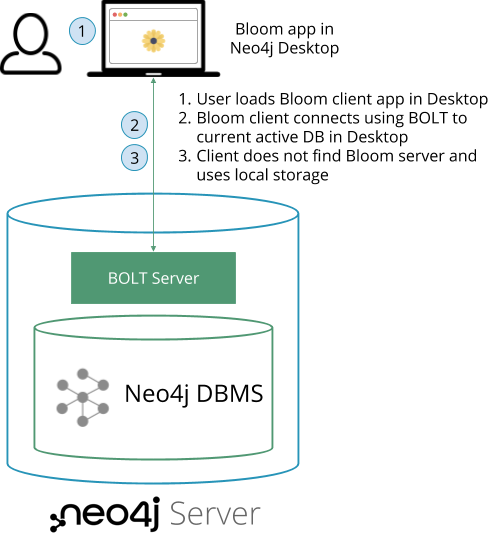
With the server plugin
This mode is useful for users who want the collaboration and persistent storage capabilities, but prefer a locally installed app. In this mode, the server plugin component is installed on the Neo4j database. The database can be locally created in Desktop, or in a remote server instance or cluster. When the Bloom client connects to the Neo4j database, it checks for the presence of the Bloom server plugin. If found, the Bloom client relies on the server to provide storage and user authorization capabilities.
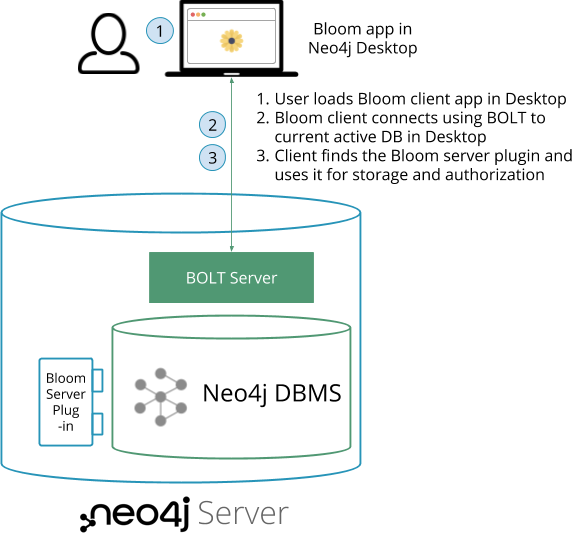
Even though the server plugin can package and host the Bloom client, you may prefer to use your own web server and host the Bloom client separately from the Neo4j database server.
Bloom web app hosted by Neo4j database server
Enterprise Edition
The Bloom server component package includes the Bloom client app. If the Bloom server is installed as a plugin to the database, then the Neo4j provided web server can also host the Bloom client so users can access it through a web browser. This setup is the easiest and most convenient to get started with server-hosted Bloom for users who will access the app via the web. It can be used for a single instance or a clustered setup of the Neo4j database.
|
It is currently not possible to connect to a local database using Chrome or Edge browsers. This is because they both block insecure (HTTP) connections. |
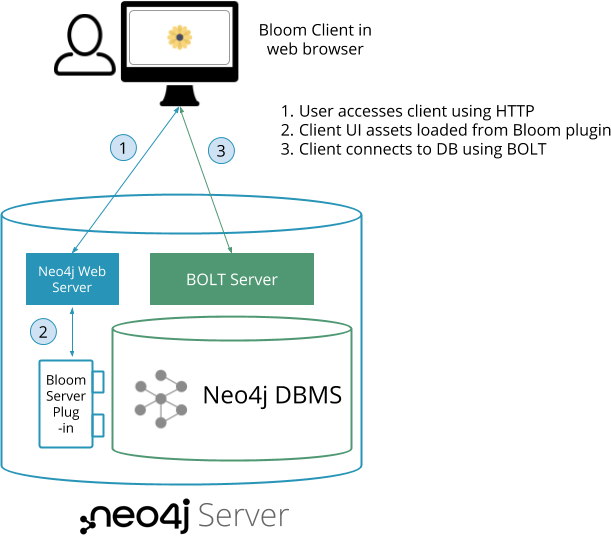
Even though the Bloom server can package and host the Bloom client, you may prefer to use your own web server and host the Bloom client separately from the Neo4j database server. See Advanced Installation for this scenario.
Bloom in Neo4j Aura
For Aura-users, Bloom can be accessed in the following ways:
-
Through Bloom in the Neo4j Aura console
-
Through the browser URL
https://bloom.neo4j.io/index.html?connectURL=[AURADBCONNECTINFO]
The Neo4j Aura console is a fully automated graph platform offered as a cloud service. It contains the Neo4j Aura Studio that consists of the functionality of Neo4j Browser, Neo4j Data Importer, Bloom, and it also offers various other functionalities from the Neo4j product catalog. In the Aura console, Bloom remains Bloom, but the Browser equivalent is called Query and the Data Importer equivalent is called Import. Bloom in Aura offers essentially the same features as the standalone Bloom.